I recently finished the first draft of Karma Ledger, a 56,000-word cyberpunk novel. For me, the point of friction in creating large-scale fiction isn’t the writing or worldbuilding — it’s the vast amount of structural detail required to effectively tell a story. Tense, character pronouns, themes, lore, and plot beats need to constantly remain in the background while I juggle characters, their motivations, what they say, and what’s going on in the world around them at any given time. It’s a lot for anyone to keep in their head, so I transformed my Obsidian vault into a writing studio where I’ve outsourced structure and consistency to Claude and a heap of custom-made Python scripts.
Markdown Materials
It all starts with text, and Obsidian is the perfect tool for this. Markdown notes on lore, characters, outline beats, and even ideas for new tools all become the rich compost in which I can grow my story. Once I add frontmatter to a note, it becomes persistent, queryable data Claude can review on demand rather than having to be re-briefed at every new session.
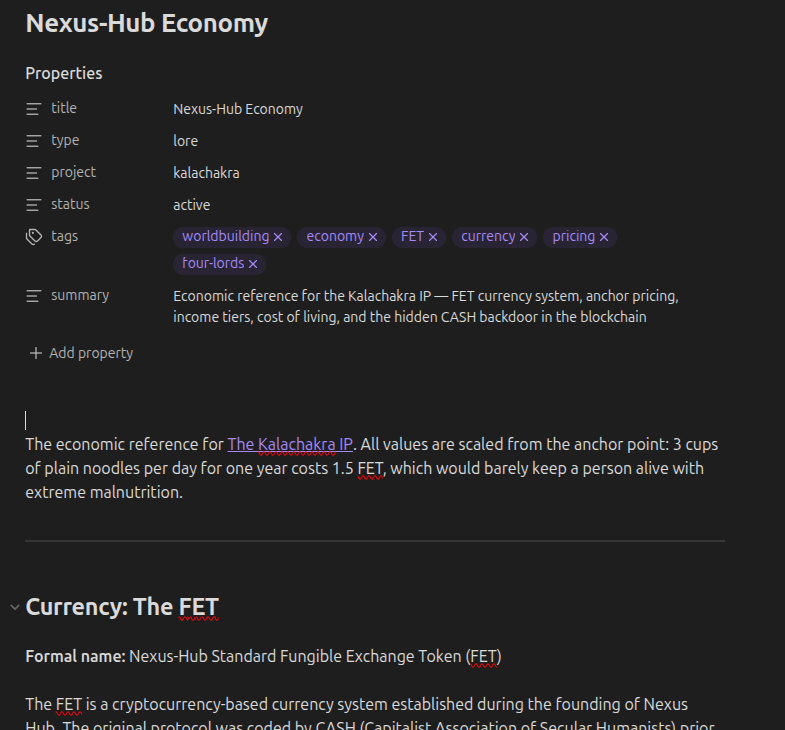 A snapshot of a Kalachakra IP markdown note in Obsidian.
Context Continuity
Writing a novel doesn’t happen in a single session, or even a single week of sessions. The process spans several weeks if not months from inception to the final period on the final beat, and the key to continuity over that time is context.md. Claude maintains it, documenting the project’s progress, my decisions as the author, and open reminders across the past five sessions. I don’t have to rely on remembering everything myself. It lives as a file for Claude to read at the start of each session and update before logging off. As a supplement, Claude uses an SQLite + FTS5 index of all my notes to look up things that live outside of context.md or the session’s context window. It doesn’t have to guess at anything.
Revision Re-Envisioned
The old workflow was that I would push through a first draft, then re-read and revise, then submit to readers for feedback, then re-read, revise, and rewrite. It was an incredibly time-consuming process that stretched across segmented headspaces. But now when I finish writing a beat or chapter, I simply type “draft update” into Claudian and it runs:
docx2txt.py— pulls the LibreOffice draft into plain text for analysis.draft_diff.py— shows exactly what’s new since the last review (baseline diff).verify_fixes.py— three-state check (FIXED / UNFIXED / UNCERTAIN) of every editorial flag from previous passes. No “did I fix that?” anxiety.lore_terms.py— checks new prose against a 100+ term glossary: known misspellings, fuzzy matches, unknown proper nouns.- Claudian’s reading pass against a codified consistency checklist: correct tense, character pronouns, dialogue voice profiles, lore consistency, and outline beat coverage.
docx_edit.py— splices corrections back in while preserving italic/bold/font runs.
The revisions happen immediately after I write the initial draft while I’m in the exact same headspace as when I created it. With this workflow, my effort is completely focused on the creative work rather than structure and technical details. I can do edits right away if Claude flags that I haven’t hit my outline beat or that there are consistency issues within what I’ve written — which means fewer edits and rewrites later.
From the reader’s perspective, crafting each of these tools seems daunting, but it’s not! I didn’t approach tool creation with a plan-then-implement strategy. I simply identified points of friction within my natural workflow, and I told Claude: “if you see a recurring bottleneck in this workflow, suggest a tool that can help correct it.” The majority of my revision pipeline was created organically that way. Something was difficult for me or for Claude, so we collaborated to find a solution.
Infrastructure Innovation
I’ve described the foundation of my new and improved writing workflow, but there are many additional tools I’ve built with Claude that have become immense time savers. Going over each in detail would severely bloat this blog entry, so I’ll just briefly mention a few favorites.
publish.py— I drafted this blog entry inside Obsidian. When it was ready, I flippeddraft: truetodraft: false, ranpublish.py, and it was live on bjbell.com a few seconds later. The whole pipeline is described in Building This Site.manuscript_template.py+format_draft.py— These create formatted templates aligned with publication standards. Gone are the days of spending hours formatting margins, headers, and paragraphs!imagegen.py+lore_cards.py— These use Gemini 2.5 Pro for concept art (book covers, characters, landmarks, etc.) as well as the art for lore entity cards on kalachakra.world. I always prefer to pay a human to do art for me when I have the means to do so, but that’s not always feasible, and visual art isn’t a skill I have. Also, being able to create a concept to give to an artist saves an immense amount of time (both for me and the artist) trying to convey what I want.- kalachakra.world API — This isn’t a script, but a substantial codebase I built with Claude. It contains the entire lore of the Kalachakra IP as it began and as it continues to evolve. Fully searchable and LLM-friendly, it’s one of the things I’m proudest of, the details of which could span multiple blog posts. It’s fully integrated into my Obsidian vault to allow Claude to reference it as I write and develop stories, ensuring that everything stays consistent.
Tangible Takeaways
This is a brief tour of my workflow, and it should be clear that at no point does the LLM actually write a novel for me. What Claude does, along with a codified workflow checklist and verification tools, is review what I write and catch hundreds of details that would otherwise have been missed or left to a later, more time-consuming revision process. Having that fallback frees me to enjoy what I love most about writing: crafting narrative.
Moving beyond “LLM as a chat partner” toward giving it tools and allowing it to use its strengths of consistency and structure has proved to be a good choice for me, and I think the work speaks for itself. Beyond that, the collaboration has transformed my workflow and made me significantly more productive. Writing is more fun for me, and that’s the best standard for measurement.
In future posts, I’d really like to dive into what makes the Kalachakra API a special tool in story development, so you can look forward to in-depth coverage once I iron out how best to structure a tour of it. In the meantime, please feel free to reach out to me via email with your musings and takes on using tech in the craft of writing: resonate@bjbell.com.